Streamer.bot Integration
Streamer.bot offers a variety of interactive features for your live stream! You can trigger your Streamer.bot actions via TikFinity's "Actions & Events" system. This requires a one-time setup.
Initial Setup
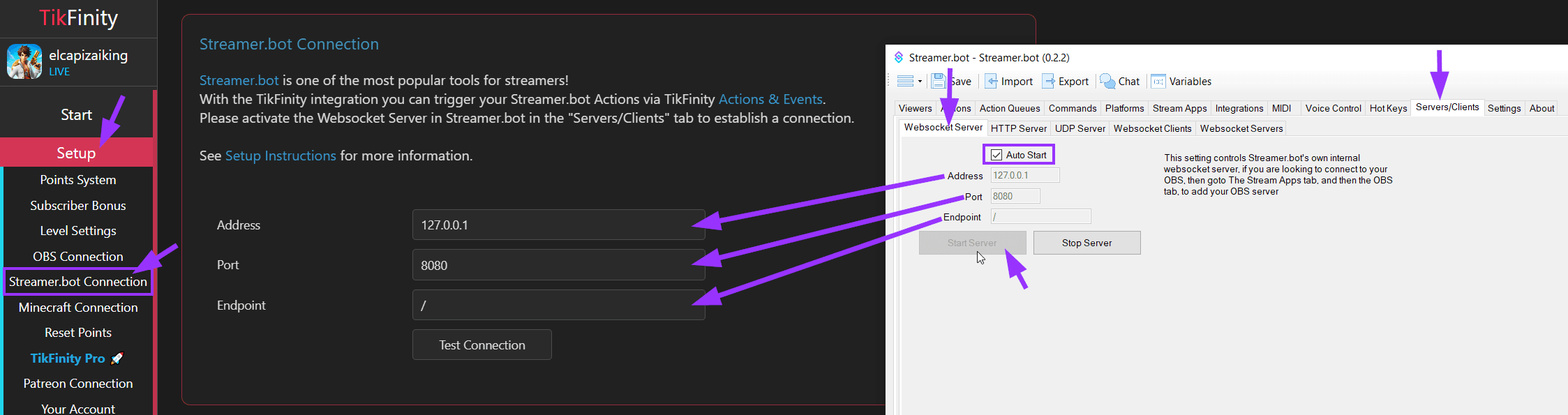
Please download the latest version of Streamer.bot and activate the "Websocket Server", which you can find in the "Server/Clients" tab. Then switch to TikFinity and go to "Setup" ->; " Streamer.bot Connection" to set the connection details. In most cases, the default values are fine. Click on "Test Connection" to check if the connection is working. If it is, you can start using Streamer.bot in the TikFinity Actions.
Using Streamer.bot Actions
- On TikFinity go to "Actions & Events"
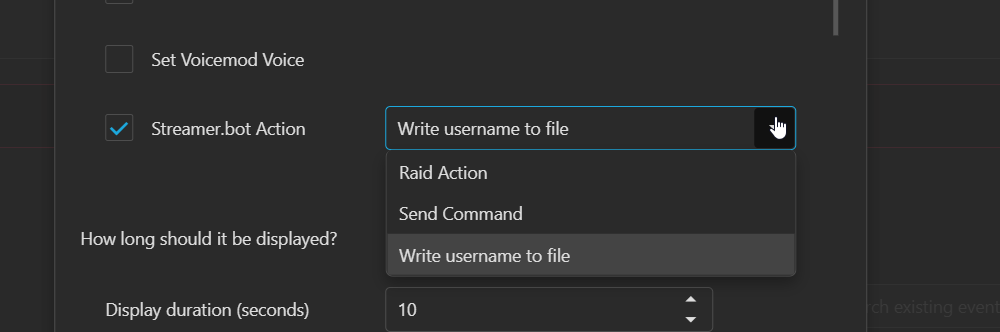
- Click on "Create Action" and select "Streamer.bot Action"
- Choose the Streamer.bot Action you want to trigger
- Click on "Save"
- Assign an Event to your Action
Also note that the information of the trigger user, e.g. the user name, is transmitted as a placeholder parameter. These placeholder parameters can be used in Streamer.bot for further processing. The following placeholder parameters are available depending on the event type:
- %userId% - Numeric TikTok User-ID
- %username% - TikTok Username (@handle)
- %nickname% - TikTok Nickname (display name)
- %profilePicturUrl% - https-URL to the profile picture of the user
- %commandParams% - The user comment or the params written for a !command
- %giftId% - Numeric Gift-ID
- %giftName% - Gift Name
- %coins% - Number of Coins sent on a gift event
- %repeatCount% - Repeat Count for a gift
- %likeCount% - Like Count
- %totalLikeCount% - Total Like Count for a user (Summed up)
- %subMonth% - Sub Month (for sub events)
- %emoteId% - ID of the emote
- %emoteImageUrl% - https-URL to the Emote
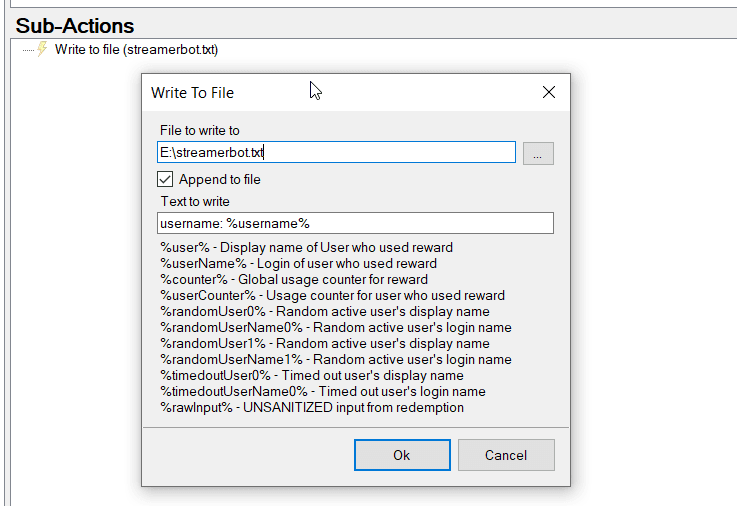
Example usage (Core -> File IO -> Write to File):
Sending Chat Messages from Streamer.bot
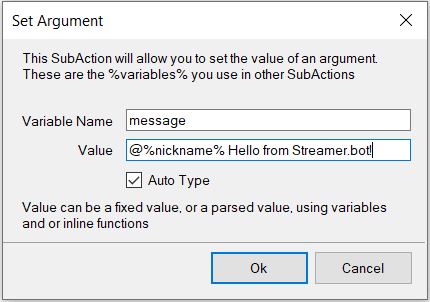
You can also send messages to your TikTok chat via Streamer.bot. To do this, go to the chatbot settings on TikFinity and activate the "Allow Streamer.bot to push messages to TikFinity" option. Then create a Streamer.bot action and add the following steps in the sub-actions:- Core > Arguments > Set Argument: Create a variable with the name "message". The value is your message text to send. You can use all the variables listed above in your message text, e.g. %nickname% to mention the trigger user.
- Core > C# > Execute C# Code: Copy and paste the following code and click "Save and Compile"
using System;
using Newtonsoft.Json;

public class CPHInline
{
    public bool Execute()
    {
        CPH.WebsocketBroadcastJson(JsonConvert.SerializeObject(new { action = "sendChatbotMessage", args = args }));
        return true;
    }
}
It should look like this:

Now you can trigger this Streamer.bot action and it will send the message to your TikTok chat. If you experience any problems, please contact us via Discord.